Logging Workouts
A workout session follows the sets defined in your active training plan, one at a time. Each step shows the target exercise, rep range, and any configured recommendation.
Starting a session
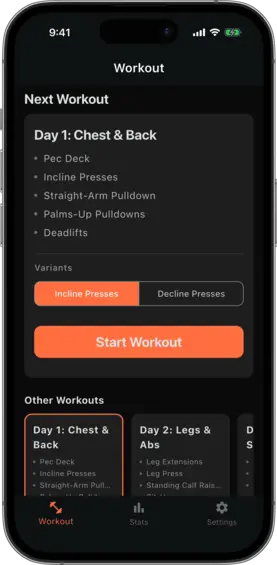
On the Workout tab, the home screen shows a Next Workout card with the upcoming workout from your active plan.
If the workout contains alternating exercise groups, a Variants section appears below the exercise list. Tap a chip to switch which alternative will be used for that session.
Tap Start Workout to begin.
Logging a set
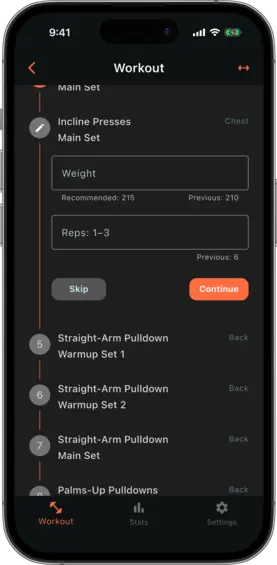
Each step of the session shows:
- The exercise name
- The target rep range
- The recommended weight or reps (if configured) — shown as helper text below the input field
Enter the weight you used and the reps you completed, then tap Log Set to advance to the next set.
The previous session’s logged values are shown for reference so you can gauge effort without leaving the screen.
Finishing a session
After the last set is logged, tap Finish Workout. The session is saved to your log, the rotation advances to the next workout in the plan, and any alternating exercise groups that completed a full plan cycle advance to the next alternative.
What gets saved
Each completed session is saved as a workout log entry containing:
- The date and time
- Which workout was performed
- Every set logged, with the weight and reps you entered
This history is used to calculate future recommendations and to populate your progress charts.