Recommendations
A recommendation tells the app what weight or rep count to suggest when you reach a set during a workout session. Recommendations are optional — sets without one simply show blank fields for you to fill in.
Configuring a recommendation
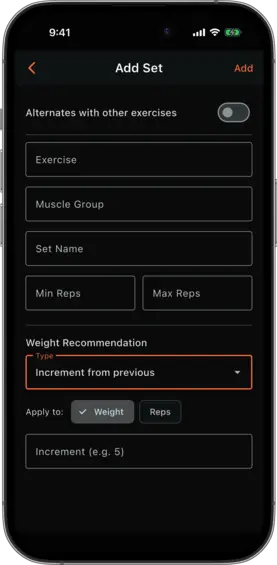
Recommendations are set when adding or editing a set, in the Recommendation section at the bottom of the set form. Each set can have one recommendation that applies to either weight or reps.
Choose a recommendation type, select whether it applies to weight or reps, and fill in the relevant parameters.
Recommendation types
Increment from previous
Adds a fixed amount to the value you logged for this same set in your most recent session.
Example: Set 1 of Bench Press with “weight: previous +5”. If you logged 100 kg last time, the app suggests 105 kg this session.
Use this for progressive overload on a primary lift where you aim to add a set amount each session.
Parameters:
- Increment — the amount to add (use a negative number to decrease)
- Apply to — weight or reps
Increment from reference set
Adds a fixed amount to the value logged for a different set (the reference set) in a previous session. The reference is looked up by Set Name from past workout logs — it does not read from the current session.
Example: You have “Set 1” (your top set) and “Back-off Set” for the same exercise. Back-off Set is configured with “weight: Set 1 +0” (or a negative increment, e.g. −20). If Set 1 was logged at 120 kg in the last session, Back-off Set suggests 120 kg (or 100 kg with −20).
Use this when a set’s target weight is defined relative to another set of the same exercise, based on historical performance.
Parameters:
- Reference Set Name — the Set Name of the set to reference (autocompleted from sets in the current plan)
- Increment — the amount to add to the reference value
- Apply to — weight or reps
Percentage of reference set
Calculates a percentage of the value logged for a reference set in a previous session. Like increment from reference, the lookup is from past logs, not the current session.
Example: A warm-up set configured with “weight: 60% of Working Set”. If Working Set was logged at 100 kg in the last session, the warm-up suggests 60 kg.
Use this for warm-up sets or back-off sets that should scale proportionally with your working weight.
Parameters:
- Reference Set Name — the Set Name of the set to reference (autocompleted from sets in the current plan)
- Percentage — expressed as a decimal (e.g.
0.8for 80%) - Apply to — weight or reps
Note: Percentage-based weight recommendations are rounded to the nearest available plate increment (2 kg in metric, 5 lb in imperial).
Viewing a set’s recommendation
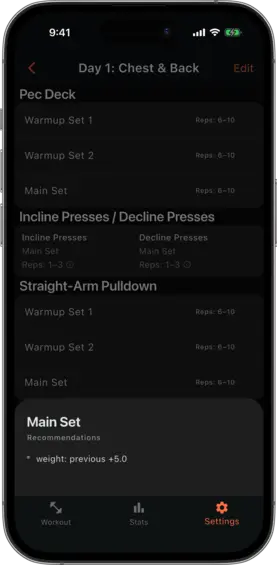
In the workout detail view, sets with a recommendation show a small info icon next to the rep range. Tap it to see the recommendation configuration in plain language.
How recommendations appear in a session
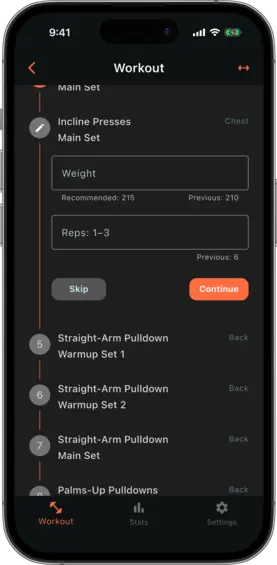
During a workout session, the recommended value appears as helper text below the input field. You are free to log any value — the recommendation is a suggestion only.